
LinkedIn Company Feed The Best LinkedIn Feed for Joomla!
Display LinkedIn Company Posts on Your Joomla Website
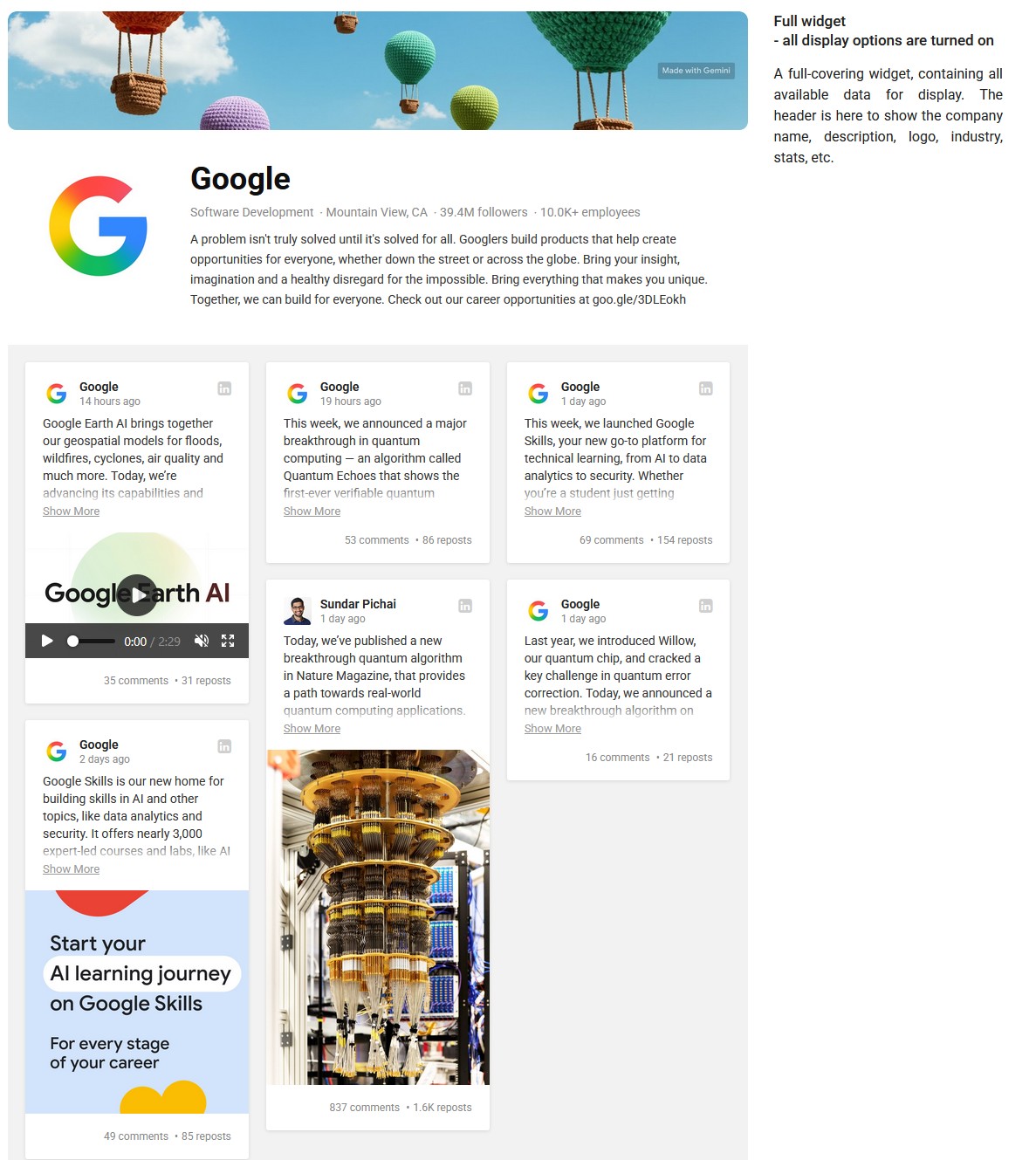
Bring your company's LinkedIn presence directly to your Joomla website. LinkedIn Company Feed automatically displays posts from your LinkedIn Company Page in a customizable, responsive feed — including post text, images, videos and company information.
Simply enter your LinkedIn Company URL, customize the widget with the integrated visual builder and place it anywhere on your Joomla website. No LinkedIn API key or coding skills required.
Turn Your LinkedIn Activity Into Website Content
Your company already creates valuable content on LinkedIn — company news, product announcements, industry insights, events, hiring updates and more.
LinkedIn Company Feed lets you reuse that content on your Joomla website automatically instead of manually copying every new post.
Visitors can see your latest LinkedIn activity directly on your website while your company page stays connected to the content you already publish.
✨ Key Features
? No LinkedIn API Key Required
Connect your company by entering its LinkedIn Company Page URL. You don't need to create a LinkedIn developer application, configure API credentials or work with the LinkedIn API yourself.
? Automatic LinkedIn Company Feed
Display your latest LinkedIn company posts on Joomla and keep the feed updated automatically. Publish on LinkedIn and use the same content to keep your website active and up to date.
? Posts, Images and Videos
Create a rich company feed using the content published on your LinkedIn Company Page. Display post text together with available media, including images and videos, rather than limiting your website to simple text links.
? LinkedIn Company Information
Go beyond individual posts and present your LinkedIn company presence as part of the widget.
Display company information such as the cover image, logo, company name, description, industry and location, together with available company statistics including followers and employees.
Individual header elements can be enabled or disabled to create the presentation you need.
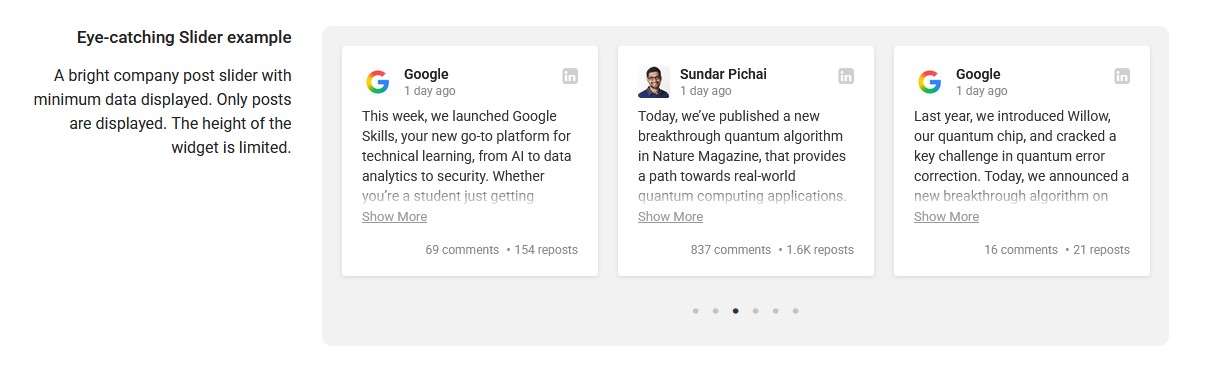
▦ Grid, Masonry and Slider Layouts
Choose how LinkedIn posts appear on your website:
- Grid — clean, structured rows and columns
- Masonry — flexible layout for posts with different amounts of content
- Slider — compact presentation that lets visitors browse posts horizontally
Configure the number of columns, spacing and other layout options directly in the visual builder.
? Fully Responsive Layout
Control how many columns are displayed at different screen sizes using responsive breakpoints.
Create a multi-column LinkedIn feed for desktop screens and automatically adapt it for tablets and smartphones.
⚙️ Control What Each Post Displays
Decide exactly which information visitors see.
Show or hide individual post elements including the author picture, author name, publication date, LinkedIn link, media and post statistics.
You can also control text presentation and automatically detect links contained in post text.
? Include or Exclude Posts by Keyword
You don't have to display every available post.
Use keyword filtering to include or exclude posts based on their content or author. This makes it possible to build a more focused LinkedIn feed for a particular page, topic or audience.
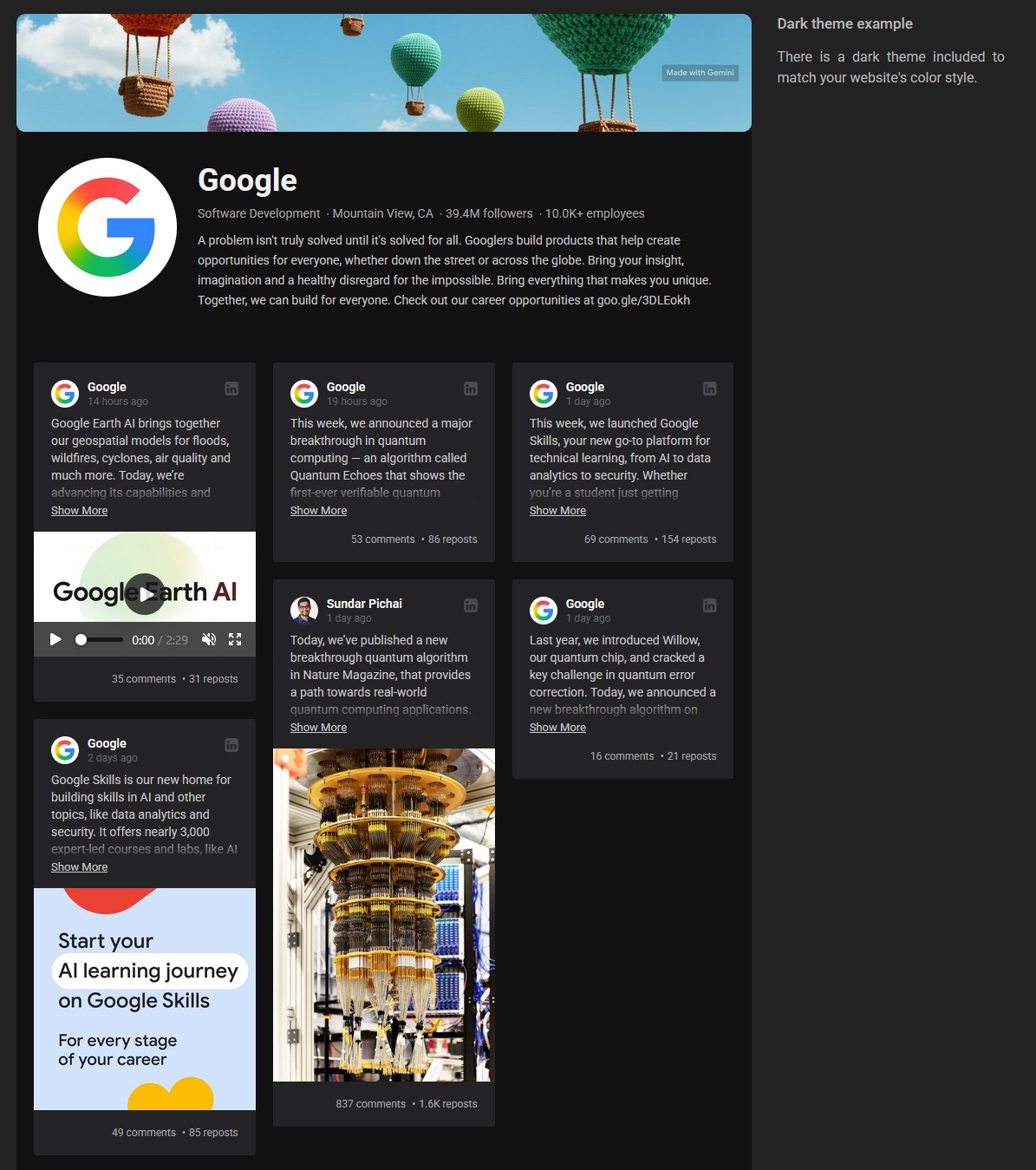
? Light and Dark Themes
Choose between Default and Dark themes and customize the appearance of the widget to better match your Joomla template.
Additional styling and display controls let you fine-tune the presentation without rebuilding the feed yourself.
?️ Integrated Visual Builder with Instant Preview
Configure your LinkedIn widget visually and see the result while you work.
The integrated builder lets you experiment with the header, posts, layout, responsive settings and appearance before publishing the widget on your website.
No coding skills are required.
? Place Your LinkedIn Feed Anywhere in Joomla
Every widget you create receives its own shortcode.
Copy the shortcode and place your LinkedIn Company Feed wherever you need it:
- inside a Joomla article
- inside a Custom HTML module
- in a template or custom layout
Create multiple widgets with different configurations and use them in different parts of your website.
? Built Specifically for Joomla
LinkedIn Company Feed is a Joomla extension installed and managed directly from your Joomla administration area.
There is no need to manually embed every LinkedIn post or build and maintain your own LinkedIn integration. Create the feed once, configure its appearance and let the extension handle the presentation of your company content.
The extension supports Joomla 3, Joomla 4, Joomla 5 and Joomla 6.
? Why Display Your LinkedIn Company Feed on Joomla?
LinkedIn is where many companies publish some of their most valuable professional content. But visitors to your website may never see it.
Bringing that activity onto your website helps you:
- Keep your website current — reuse recent LinkedIn updates without manually recreating them in Joomla.
- Show that your company is active — recent posts provide visible evidence of ongoing company activity.
- Build professional credibility — present company news, achievements, events and industry insights where prospective customers already interact with your brand.
- Get more value from existing content — one LinkedIn post can also become useful content for visitors to your website.
- Connect your website and LinkedIn presence — give visitors a natural path from your Joomla website to your company activity on LinkedIn.
? Easy to Set Up
Getting started takes only a few steps:
- Install LinkedIn Company Feed on your Joomla website.
- Enter your LinkedIn Company Page URL.
- Customize the feed using the visual builder.
- Copy the generated shortcode.
- Place it where you want the LinkedIn feed to appear.
That's it — no LinkedIn API key and no custom coding required.
❓ Frequently Asked Questions
Can I display LinkedIn Company posts on a Joomla website?
Yes. LinkedIn Company Feed lets you display posts from a LinkedIn Company Page directly on your Joomla website, including post text, images, videos and available post information.
Do I need a LinkedIn API key?
No. You don't need to create a LinkedIn developer application or configure LinkedIn API credentials. Simply enter the URL of the LinkedIn Company Page you want to display.
Does the LinkedIn feed update automatically?
Yes. The widget automatically retrieves updated content from the configured LinkedIn Company Page, so you don't need to manually add new LinkedIn posts to your Joomla website.
Can I customize the LinkedIn feed layout?
Yes. You can choose Grid, Masonry or Slider layouts, configure columns and responsive breakpoints, select a Default or Dark theme, and control which company and post elements are displayed.
Can I display only selected LinkedIn posts?
Yes. LinkedIn Company Feed includes keyword filtering that lets you include or exclude posts based on post content or author.
Where can I display the LinkedIn feed in Joomla?
You can place the generated widget shortcode inside Joomla articles, Custom HTML modules, templates or custom layouts. You can also create multiple widgets with different configurations for different parts of your website.
? A LinkedIn Feed Made for Joomla
Whether you're building a corporate website, agency site, recruitment portal, professional services website or another business-focused Joomla project, LinkedIn Company Feed gives you a flexible way to integrate your company's LinkedIn activity into your website.
Display your latest LinkedIn company posts, images, videos and company information, choose how the feed looks and control exactly what your visitors see — directly from Joomla.
Bring your LinkedIn Company Page to your Joomla website.
Отзывов: 2
Nick Kordova
LinkedIn Company Feed is the best LinkedIn extension for Joomla I've found.
Sun Will
This extension is AWESOME!
- Added Joomla 6.2.x compatibility
- Added translations: Čeština, Dansk, Deutsch, Español, Français, हिन्दी, Italiano, Nederlands, Polski, Português, 中文
- Added GDPR-Friendly Media Loading mode
- Minor fixes
- Added Joomla 6.1.x compatibility
- Minor fixes
- Fixed company URL parsing
- Small fixes
- Fixed "Call to undefined method... _getMediaURI" error
- Added Joomla 6.x support without compatibility plugin
- Maintenance Update
- Fixed error message upon installation on Joomla 5 and 6
- Added Joomla 6.x support
Пожалуйсте войдите в свой аккаунт, чтобы получить доступ к поддержке.